
imo video calls and chat pro
Baby PenguinSocial
2.454.00 Reviews
- Version
- 9.8.000000011438
- Installs
- 10.00K
- Age Rating
- Everyone
Screenshots

Our Review of imo video calls and chat pro
 Analysis by Appyee
When it comes to staying connected in today’s fast-paced world, having a reliable video calling and chat app is essential. That's where imo video calls and chat pro comes into play. I recently took it for a spin, and here’s everything you need to know about it.
Who may find imo useful
I can see this app fitting a household where relatives already use it and want one familiar place to call or message. If someone in the family finds more elaborate social apps confusing, a simple route to chats and calls can matter more than a long list of extras. It may also suit friends who need to coordinate casually without turning every conversation into a public post or a larger social feed.
A realistic use case is checking in with a parent who lives in another city: a quick message can establish that they are free, then a voice or video call can handle the conversation. For a group planning a shared meal, a chat can keep the time and practical details together rather than scattering them across separate texts. These are ordinary tasks, but they are where an uncomplicated communication app can earn a place on a phone.
That said, I would not choose it automatically just because a relative uses it. The app is listed as a social product from Baby Penguin, costs $4.99, and includes in-app purchases priced at $9.99 per item. I would check the purchase flow and the exact terms shown on my device before committing, especially if I only need occasional calls. Its average rating is 2.4 from 85 ratings, with 49 written reviews, so I would treat the positive impressions below as personal rather than assume every user will have the same experience.
Trust is more than a call button
Communication apps handle conversations that can be personal, so I think about trust in practical terms: what choices are visible, what permissions are requested, and whether I understand how to manage my account. I don’t treat a polished interface or a privacy-related feature name as proof of a complete privacy story. Before using any messaging app for sensitive topics, I would read its current privacy information and review the device permissions it asks for.
The app’s Everyone content rating makes it broadly suitable for general audiences, but that rating is not a promise about privacy or a recommendation for every child to use it unsupervised. For a family account, I would talk through who can contact whom and what information should stay private. A simple ground rule—such as not sharing verification codes or personal details in a chat—can be more useful than assuming the app itself will prevent every mistake.
For a first setup, I would grant only the access needed for the task at hand. A video call needs camera and microphone access while the call is active; sharing a photo may involve photo access. If the operating system offers a choice between limited and broader access, I would choose the narrower option when it works for me. I would also revisit permissions later rather than treating the initial setup prompt as a permanent decision.
Getting Started with imo
First off, downloading and setting up imo video calls and chat pro is a breeze. Available on both Android and iOS, you can find it on your respective app store. Once installed, creating an account is straightforward – just a phone number verification, and you’re good to go.
What struck me immediately was the app’s user-friendly interface. It’s clean, intuitive, and doesn’t bombard you with unnecessary features. This simplicity is perfect for anyone who wants to jump straight into making calls or sending messages without a steep learning curve.
Before the first call
Phone-number verification is convenient when the people you want to reach already recognize that number, but it also makes the account setup feel closely tied to your phone identity. I would check that I’m using the right number before confirming, and I’d avoid sharing verification codes with anyone, even a person who claims to be helping. If I change numbers later, I would look for the account-management options in the app instead of assuming my contacts will automatically follow.
The current version is 9.8.000000011438, and the stated minimum operating system is version 5.0. Those details matter if you are helping someone with an older device: check the store page on that exact phone before planning a family switch, because compatibility can differ between devices and operating systems. imo has 10K+ installs, which suggests it has an existing audience, but that alone cannot tell me whether the people I want to contact are active on it.
Video and Voice Call Quality
Now, let's talk about what really matters: the call quality. I tested both video and voice calls under various network conditions. When connected to Wi-Fi, the video quality was crisp, with minimal lag. Even on a decent mobile data connection, the app performed admirably, maintaining clarity and synchronization.
Voice calls were equally impressive. The sound was clear, and there was hardly any noticeable delay, which is crucial when you’re having a conversation. It seems like imo has invested well in their call technology, ensuring that users have seamless experiences.
Making calls work in everyday conditions
For an important conversation, I would do a short test call first rather than discover a weak connection halfway through. If the picture freezes, switching from video to voice can preserve the conversation while using less bandwidth; if the audio is choppy too, moving closer to the router or waiting for a steadier connection is more sensible than repeatedly redialing. These are small habits, but they help separate an app problem from a connection problem.
Video calling also has a social trade-off: it is useful when facial expressions matter, but it asks more of the caller’s surroundings, battery, and attention than a quick voice call. I would choose video for a family catch-up or showing someone something in the room, and voice when I’m walking, in a noisy place, or trying to keep the conversation private from people nearby. No calling app can make a poor network behave like a strong one, so I would keep a regular phone call as a fallback for urgent situations.
Messaging Features
Aside from calls, imo offers a robust messaging platform. You can send text messages, voice messages, and even share multimedia files like photos and videos. What I loved the most was the ability to create group chats. It’s perfect for keeping in touch with family or coordinating with friends or colleagues.
An interesting feature I stumbled upon is the encrypted messages option. In a world where privacy is paramount, this is a reassuring addition for anyone concerned about the security of their conversations.
Choosing the right conversation format
For a group chat, I find it helpful to agree on what belongs there before adding every family member or coworker. A practical group can focus on a shared purpose—such as arranging a visit—while a separate one-to-one chat is better for personal details. That keeps important plans easier to find and reduces the chance that a private message ends up in the wrong conversation.
Voice messages can be a useful middle ground when typing is awkward but a live call is not convenient. I would keep them short and include the key point near the beginning, since the recipient may be listening while busy. For photos and videos, I would pause before sending anything sensitive and confirm the intended recipient, especially in a group. The ability to send media is convenient, but it also makes a quick check of the chat name worthwhile.
The encrypted-messages option is a positive sign for users who care about privacy, but I would not assume that every conversation or every kind of content is covered in the same way. I would check how the option works inside the app and make sure the person I’m speaking with is using the intended conversation mode. For highly sensitive information, I would be cautious until I understood the app’s current explanations and settings.
Additional Features
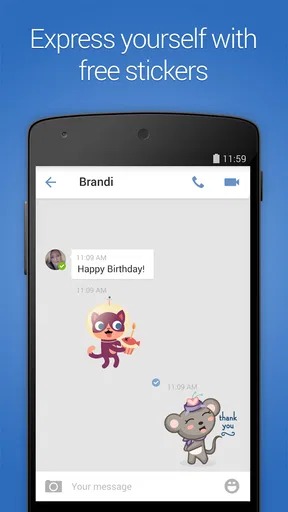
Beyond the basics, imo has a few more tricks up its sleeve. There are customizable stickers and emojis that add a fun element to your chats. While not groundbreaking, they are a nice touch and can make conversations more lively.
Another feature worth mentioning is imo’s support for international calls. This is particularly handy for those with friends or family overseas. The rates are competitive, and the quality doesn’t falter, which is a huge plus.
International conversations and spending
International calling can be useful when relatives live abroad, but I would distinguish app-to-app calls from any paid calling option before relying on it. Check the rate or purchase details shown at the point of use, and confirm whether the other person needs the app too. The listed $9.99 per-item in-app purchases make it especially sensible to review each purchase screen rather than assume every call or feature is included in the initial price.
If I’m coordinating with someone in another country, I would agree on the app and a backup method before the call. That avoids a last-minute scramble if the other person has not installed it or cannot connect. I would also be mindful of mobile data when calling away from Wi-Fi; a voice call may be the more practical choice when data use or connection stability matters.
Performance and Usability
In terms of performance, imo is lightweight and doesn’t hog too much of your device’s resources. This is crucial for older phones or those with limited storage. I didn’t experience any crashes or slowdowns during my time with the app, which speaks volumes about its stability.
Usability-wise, the app is straightforward. The navigation bar at the bottom makes it easy to switch between calls, chats, and contacts. It's all streamlined, ensuring you don’t waste time fumbling through menus.
Controls worth checking
A familiar layout is helpful, but I would still take a minute to inspect the controls that affect my experience: notification preferences, contact access, and any account or privacy settings visible in the app. Turning off notifications for a busy group can make the app less intrusive without leaving the conversation. If I no longer want a particular permission enabled, I would review it through the phone’s settings and check whether the feature I rely on still works afterward.
Before sharing a device with someone else, I would make sure the account is not left open in a place where messages could be read accidentally. On a personal phone, a screen lock and careful notification previews can help protect conversations from casual viewing. These are device-level choices, not special guarantees from imo, but they are part of using any chat app thoughtfully.
Compared with the usual options in social communication, imo’s appeal is its focus on direct calls and messaging rather than a broad feed or a large collection of social tools. That can be a relief for someone who only wants to reach family. On the other hand, if all of my contacts already use another established messenger, asking them to install a second app may create more friction than value. For public communities, richer collaboration, or a wider set of account controls, I would compare alternatives on those specific needs instead of choosing solely for a simple interface.
Final Thoughts
Overall, imo video calls and chat pro stands out as a solid choice for anyone looking to stay connected through voice and video calls. Its simplicity, combined with excellent call quality and a decent range of features, makes it a worthy contender in the crowded app market.
Whether you’re tech-savvy or just need something reliable to keep in touch with your loved ones, imo has got you covered. So, if you’re in the market for a new communication app, give imo a shot. It might just become your go-to app for staying connected.
My cautious recommendation
I would try it when the people I want to contact are already willing to use it and I value straightforward calls and chats more than a wider social platform. I would be more hesitant if I need detailed, clearly documented privacy controls, if I’m trying to avoid an upfront cost and optional purchases, or if my contacts are settled on a different messenger. In those cases, the familiar alternative may be the more useful choice, even if its interface is busier.
My practical advice is to confirm the app is compatible with the device, review the account and permission choices during setup, make a brief test call, and inspect any payment details before buying anything. With those checks, imo can be a convenient way to keep conversations close. I would still use it with ordinary care around personal information and treat its modest user rating as a reason to decide for myself rather than as a guarantee of either a bad or a great experience.
Verdict
Strengths of imo video calls and chat pro
- High-quality video calls.
- Easy-to-use interface.
- Supports group chats.
- Low data consumption.
- Cross-platform availability.
Limitations of imo video calls and chat pro
- Ads can be intrusive.
- Limited customization options.
- Occasional call drops.
- No end-to-end encryption.
- Some features are paid.
Other Releases by Baby Penguin
View All
imo video calls and chat HD
Communication3.8

imo live
Social3.6
Similar Picks in This Category
View All
Meta Platforms, Inc.4.6

Instagram4.0

Likee-Live, Chat & Party Games
Likeme Pte. Ltd.4.4

Facebook Lite
Meta Platforms, Inc.4.5

TikTok - Videos, Shop & LIVE
TikTok Pte. Ltd.4.0

Moj: Free Short Drama & Reels
ShareChat4.1
Frequently Asked Questions
What features does imo Video Calls and Chat Pro offer?
Imo Video Calls and Chat Pro provides high-quality video and voice calls, instant messaging, and group chats. It supports multimedia sharing and offers a variety of stickers to enhance conversations. The app is optimized for both low and high-bandwidth connections, ensuring clear communication regardless of network quality.
Is imo Video Calls and Chat Pro secure and private?
Imo Video Calls and Chat Pro uses encryption to protect calls and messages, ensuring user privacy and security. However, like any app, it is important to use strong passwords and be cautious with personal information. Regular updates often enhance security features, so keeping the app updated is advisable.
Does imo Video Calls and Chat Pro consume a lot of data?
The app is designed to optimize data usage, offering quality communication even on 2G networks. It adjusts the quality of calls based on your connection strength to save data. However, video calls typically consume more data than voice calls or texts, so monitoring usage is recommended.
Can imo Video Calls and Chat Pro be used across different devices?
Yes, imo Video Calls and Chat Pro supports cross-platform functionality. It is available for Android and iOS, allowing users to communicate seamlessly across different devices. The app syncs chats and calls, providing a consistent experience whether on a smartphone or tablet.
Are there any costs associated with using imo Video Calls and Chat Pro?
Imo Video Calls and Chat Pro is free to download and use for basic features like messaging and video calls. However, it may offer in-app purchases or premium features for an enhanced experience. Always check for any subscriptions or costs before making purchases within the app.
